Guide, for the Deal team
Allocate and send packs for signature
Turn indications into allocations, confirm them by email, then generate and send each investor's pack.
Where: Raise hub, Allocations
Read the indications
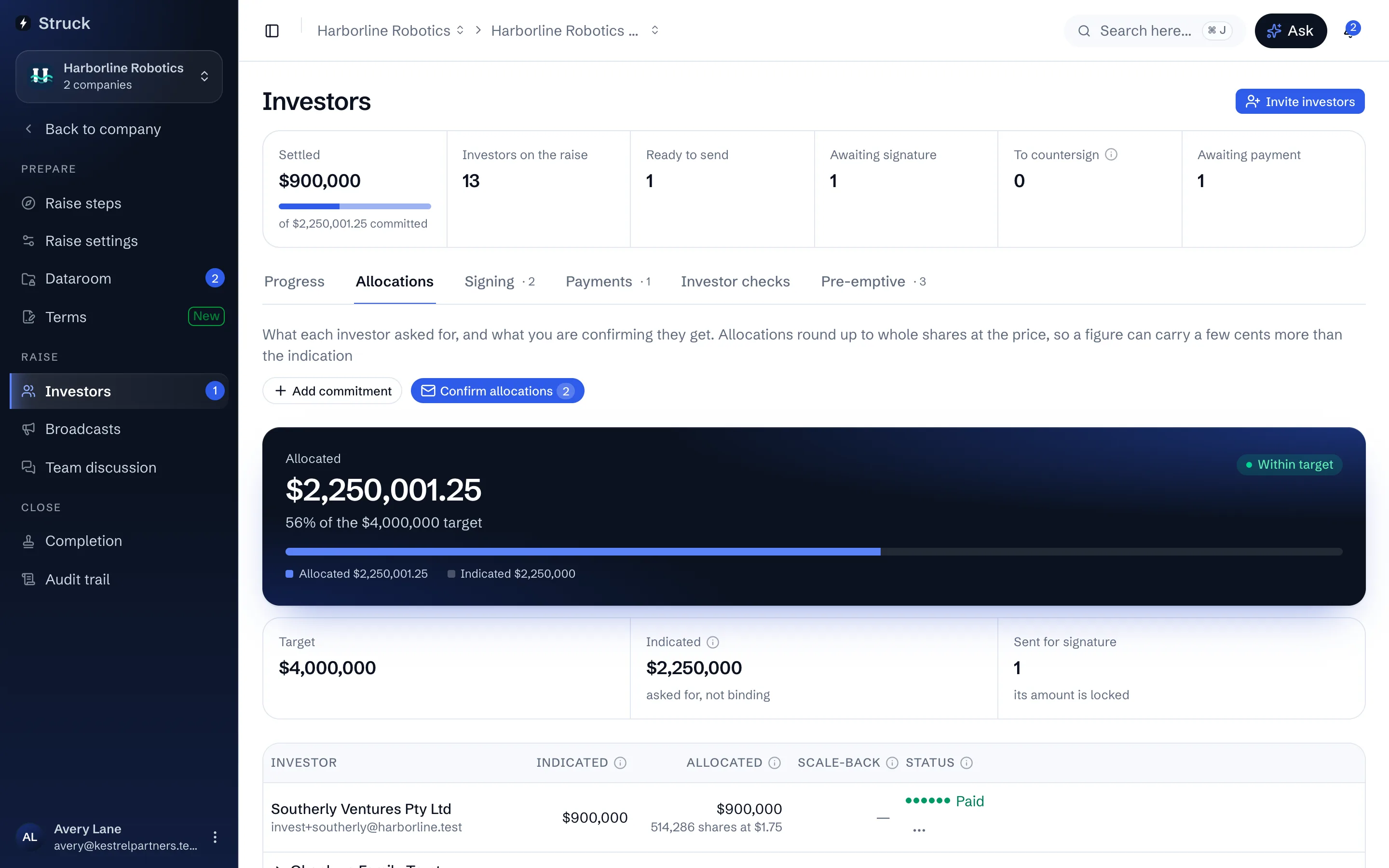
Allocations lists every investor with what they Indicated and what is Allocated. An indication is interest, not a commitment. The band at the top shows allocated against indicated money and against the target.
A trust is asked, under Members on its row, whether it holds as bare trustee. A bare trust cannot be allocated to until its members are recorded, because each member counts against the s708 caps on their own qualification; a trust that holds for itself is one investor.
Set each allocation
Type into the Allocated cell of an unsent row and press Enter or Save; a hint shows the rounded amount and the share count where the round is priced. Allocate as indicated takes the investor's figure in one press. Add commitment creates a row for an investor who has not indicated. On a multi-class round, the row also carries a Share class.
Deal with oversubscription
If allocations exceed the target, an Oversubscribed panel offers two ways out. Scale back to target trims every unsent allocation proportionally so the total lands on the target; packs already sent are never rewritten, and the dialog names which investors a scale-back would touch. Accept the oversubscription raises the target instead.
Confirm the allocations by email
Press Confirm allocations, then Confirm and email. Each investor gets one email naming their allocated amount, the shares and price where the round is priced, and what happens next. On their side, the investor accepts the amount or asks for a different one, and the row's progress dots track Confirmed and Accepted.
Generate the packs
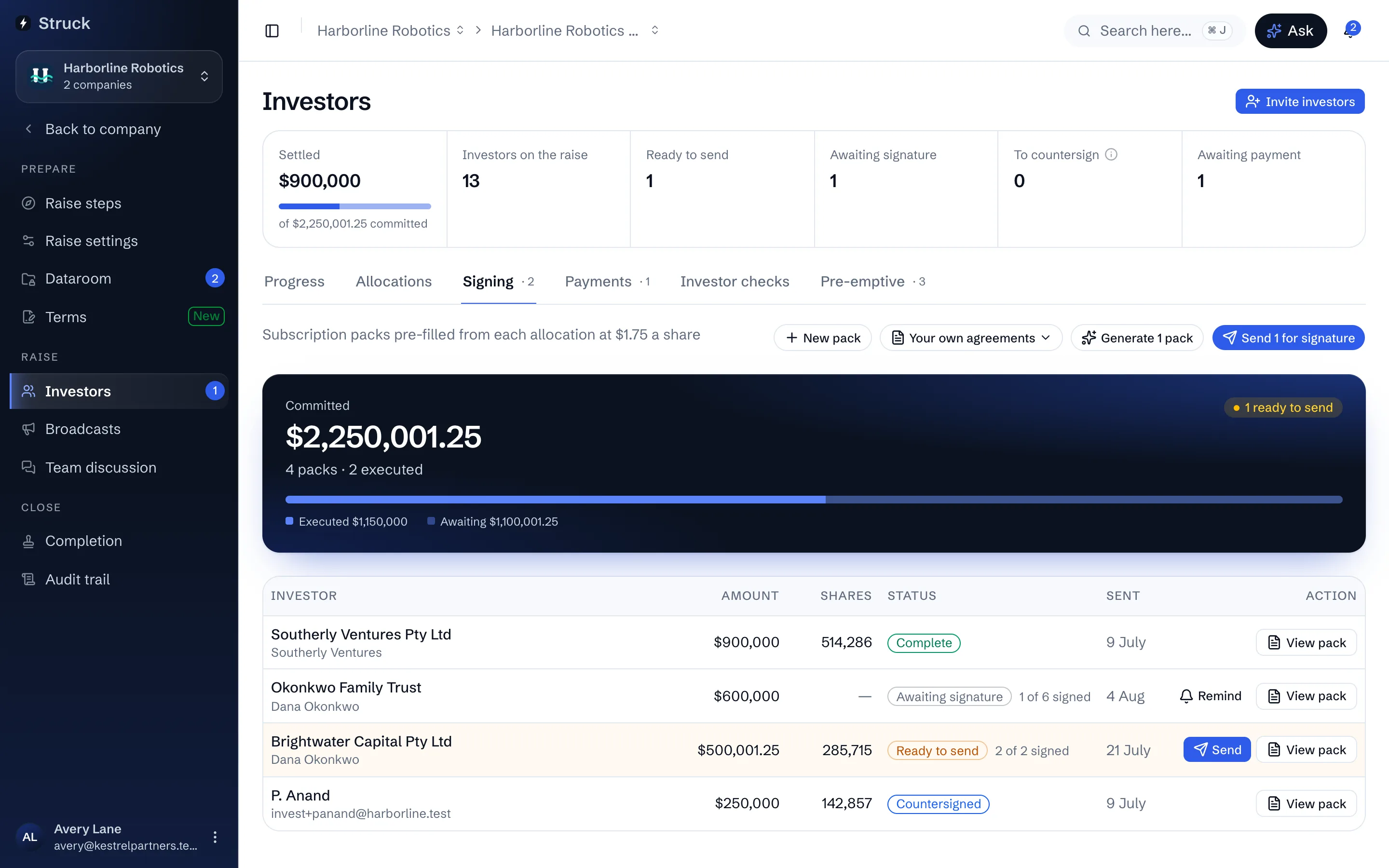
On Signing, press Generate packs. Each pack is the agreement template filled from that investor's allocation and profile: the legal name that goes on the register, the amount, the signers for a trust or company. Rows read Ready to send.
Send the lead first, then everyone else
Press Send on the lead's row, then Send for signature for the rest. The dialog says what happens: the investor is emailed a legally binding subscription agreement to sign for their committed amount, and a sent pack cannot be recalled, only reminded. From the moment a pack is sent its amount is locked. A pack only goes out once the investor has accepted their confirmed allocation; until then its row reads Awaiting investor's acceptance.
The email comes from Struck, not the e-signature provider, so the investor sees the company's name throughout. The signing itself happens inside the app.
Or send agreements you prepared yourself
If you or your lawyer wrote each investor's agreement already filled in, open Your own agreements on Signing and choose Upload prepared agreements, before sending. Upload one PDF per investor; Struck reads each and suggests whose it is, so check every row says Name and amount found in the document, then press Attach. Next, Place the signature boxes: on the first agreement, drag a box onto the line where the investor signs, add a Co-signer box for each extra person who signs for an investor, and put each company signatory's box where they sign, then Save boxes. Every investor's agreement is then sent with the boxes in those same spots, so they all need their signing block in the same place. Send as usual: the investor side signs first, then the company's signatories sign inside the document, which is their countersignature.
A prepared agreement states the amount it was written for. If an allocation changes afterwards, the row says so and the send refuses until you upload the updated agreement. An agreement with a different number of pages from the one the boxes were placed on is refused too, rather than sent with a box over the wrong text. Use the generated agreement, in the pack, goes back to Struck's own for that investor.
Chase the unsigned
The Signing table shows every pack as Awaiting signature, Signed, Countersigned or Complete, and a pack with several signers shows how many have signed. Remind on a row sends a nudge, and automatic reminders go out at 3, 7 and 14 days on their own while Chase investors automatically is on (Raise settings, Room). Recall pack to amend, from the Allocations row, is the way to change an amount after sending.
Read next
- Allocations and scale-backHow it works
- Signing packs and countersigningHow it works
- Your investor profileHow it works