Guide, for the Deal team
Control who sees what in the dataroom
Investor groups, the folder grid, per-document grants, the teaser tier and the NDA gate: the controls that decide what each investor can open.
Where: Raise hub, Dataroom access
Know the groups
Every raise starts with four groups: Advisors and Company, which are the deal team, and Sophisticated and Retail for investors. An investor joins a group when they are invited, through the Tier field on the invitation, and everything they can see follows from that group's grants. Investors who arrive any other way join Sophisticated: a lead named when the raise is created or on its term sheet, someone you let in from an access request, and a holder sent a pre-emptive offer. A group only decides access: whether an investor counts against the small-scale caps comes from their certificate, never from their group.
Set the folder grid
On the dataroom's Access tab, each row is a folder and each column an investor group. Switch View on to let the group open a folder in the secure viewer, and Download on only where you are happy for them to keep a copy of the folder's spreadsheets. Download never applies to any other file. A subfolder reads Same as its parent until you set it on its own.
Investors never see the grid. A folder they were not granted simply does not exist for them.
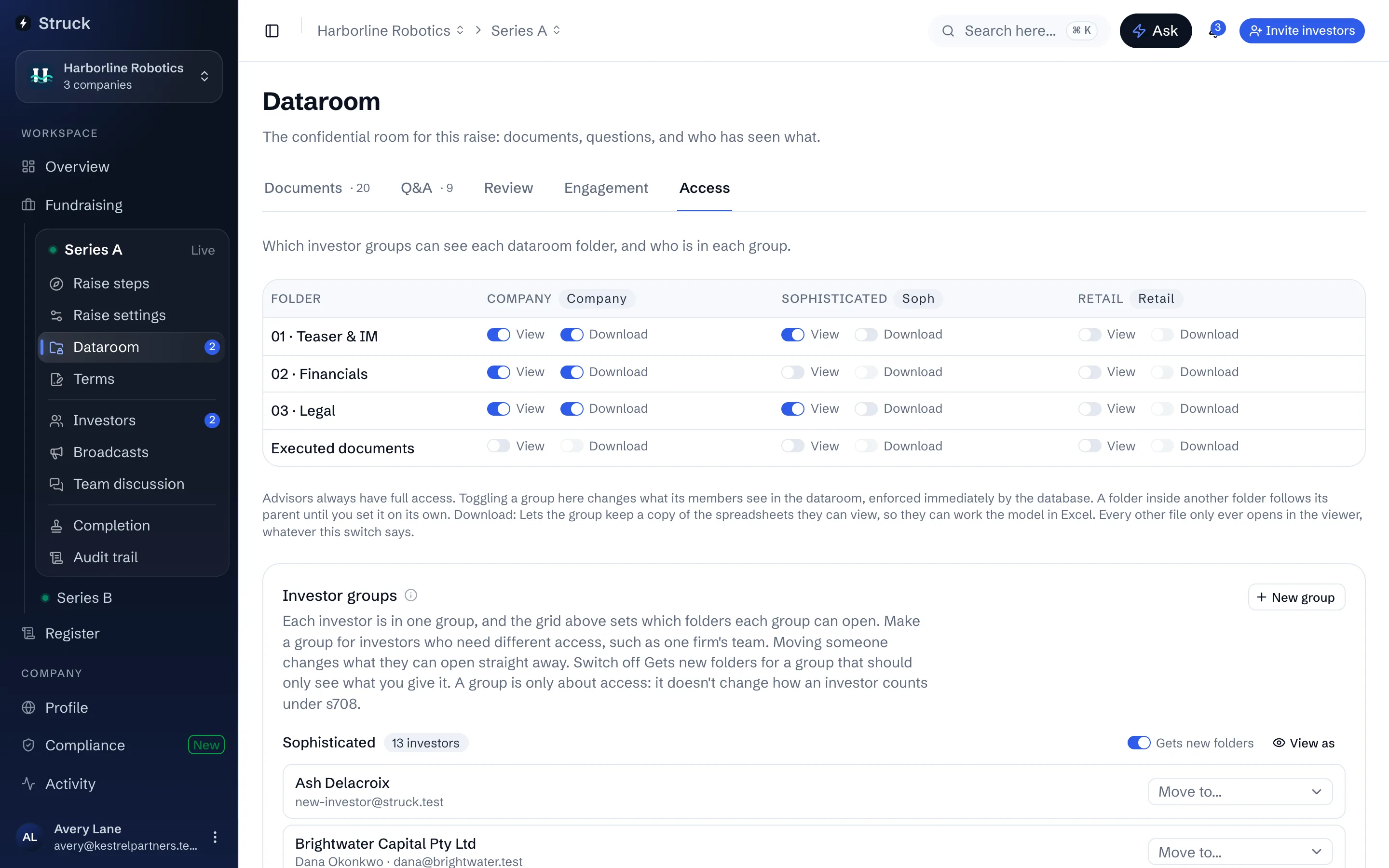
Make a group for investors who need different access
Under Investor groups on the Access tab, press New group, give it a Name and choose Start with the same folders as, usually the group those investors are in now. It appears as a new column in the grid, where you switch on the folder only they should see, or switch off the one they shouldn't. Then choose Move to… on each investor's row to put them in it. What they can open changes straight away, for everyone on their team, and the move is on the audit trail.
A group you made can be renamed or deleted from its menu, once nobody is left in it; Sophisticated and Retail stay. Only the deal team sees group names. An investor listed under Not in a group can't open any folder until you put them in one.
Decide which groups get new folders
A folder you add to the room opens to every group with Gets new folders on, which is where most groups belong. Switch it off for a group that should only see what you give it, such as board observers: a new folder then stays closed to that group until you open it on the grid. New group sets it for you, on when the group starts as a copy of one that gets new folders and off when it starts with No folders yet. Files work the same way: one uploaded into a folder starts visible only to the groups that can already open that folder.
Check what one group sees
Choose View as beside a group on the Access tab, or View as investor in the room and then pick the group at the top. The room shows exactly the folders that group can open, Before the NDA or once it is accepted. Every group shows what all of them can open, which is the view to check before you open the room to everyone.
Add a per-document exception where a folder grant is too broad
From a document's menu choose Manage access to share that one document with specific groups. A document grant only ever adds to what the folder already allows; it never takes access away. Use it for the odd document one group should see inside a folder the others cannot.
Decide what sits in front of the NDA
A folder marked Make teaser (pre-NDA) is readable before the NDA is accepted; investors see a banner that the confidential room unlocks once they accept. Keep the teaser to what you would show anyone you invited: the deck, the summary terms. Move behind NDA puts a folder back inside the gate.
Watch the NDA gate
The NDA gate panel on the Access tab lists every investor with their state: Accepted in-app, Signed off-platform, Uploaded, awaiting review, or Not yet. An investor who uploads a signed copy instead of clicking through waits there until you press Accept uploaded NDA. Record signed NDA is for an NDA executed outside the platform, with the date, a reference and a scanned copy if you have one.
The NDA itself is Struck's mutual non-disclosure agreement, an agreement rather than a deed, accepted as a click-wrap; a person acting for the company adopts it once for the raise from the Adopt the NDA card on this tab, which binds the company's side. There is an individual wording and an entity wording, and a team member who cannot bind their entity is told so instead of being shown the button.
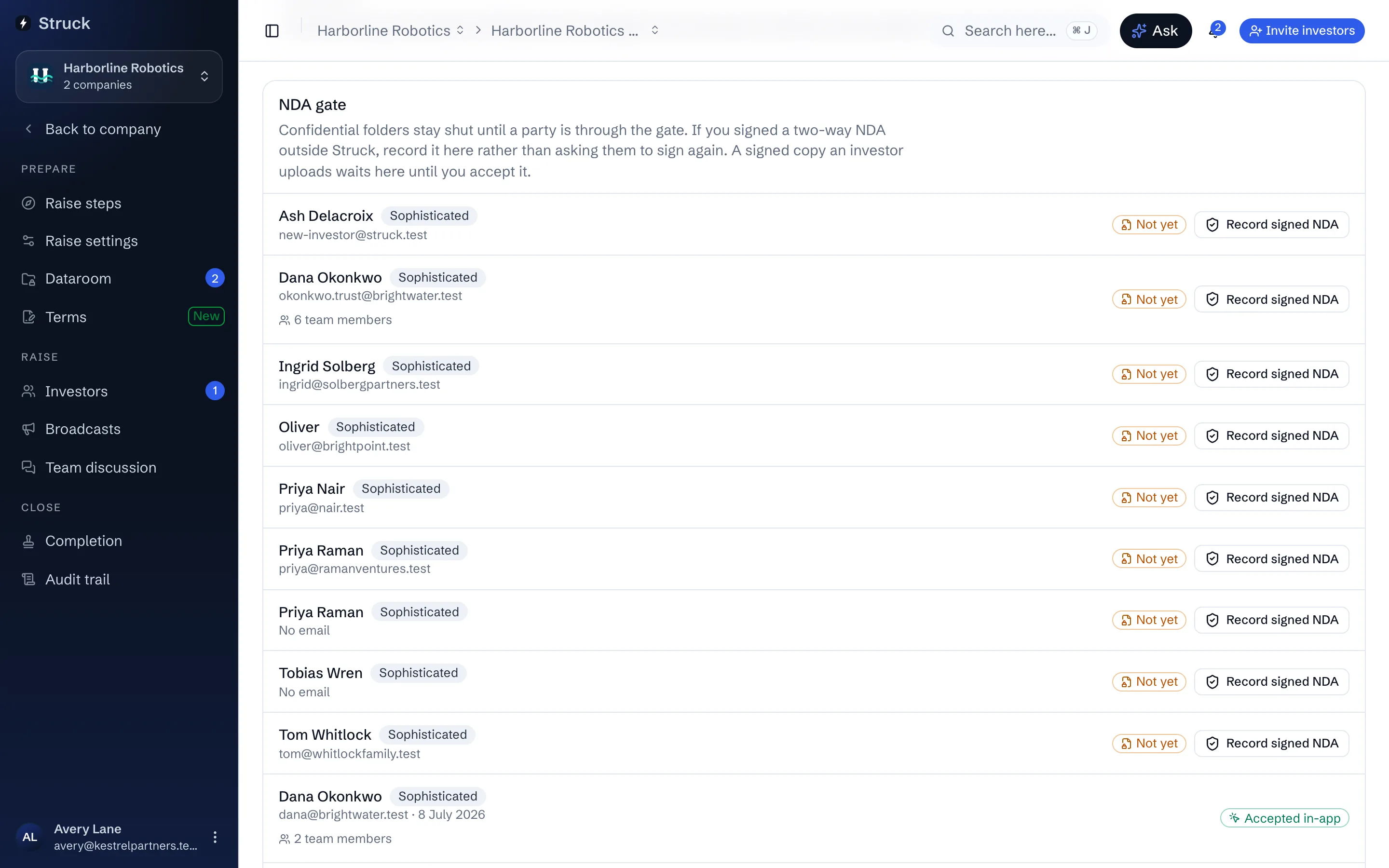
Remember what the viewer does on your behalf
Documents are served as watermarked page images carrying the viewer's email and the time, and every open and every page read is logged. For a document where the stamp gets in the way, such as a teaser, Turn watermark off in its menu shows it without one; it is still served as images and still logged. An Excel model opens for investors as a live model they can change the inputs of, recalculated on Struck's servers so the formulas never leave the room; one that would calculate differently from Excel opens as pages, and the viewer tells you which cell disagreed. Only the deal team can download the original of any file. Investors can download spreadsheets alone, and only where their group has Download on; a contributing advisor can download spreadsheets too. Either way each Excel copy is stamped with who took it and when, and each download is logged too. So a View grant is safe by default, and the Engagement tab is where the log becomes a report.
Videos are the exception. A video plays with the viewer's email over the picture and each open is logged, but it streams to their browser, so anyone who can watch it can keep a copy. Share a video only with groups you would be happy to hand the file to.
Choose which numbers investors can change
An Excel model opens for investors as a live model, where they change numbers to try their own assumptions. Out of the box they can change any number that isn't a formula, which includes things like month numbers and past results. To limit it to your assumptions, open the model and press Choose editable numbers. Click the numbers investors may change, drag across several, or click a column letter or row number for the whole line, then press Save. Allow every number undoes it. The choice is for that version of the file, so choose again after you upload a new one. Until someone chooses, a model with more than 50 changeable numbers reminds the company and the lead advisor.
You always see a selected cell's formula in the formula bar above the grid. Investors only see formulas if you switch on Show formulas to investors for that model; it stays on for later versions of the file.
Read next
- Dataroom access by groupHow it works
- How the dataroom protects documentsHow it works
- Who sees whatHow it works
- The engagement reportHow it works