Guide, for the Deal team
Countersign and record payments
Make each subscription binding with the company's countersignature, then track the money as it reaches the company's own account.
Where: Raise hub, Payments
Countersign each signed pack
A pack that reads Signed on the Signing screen is waiting for the company. Open it and press Countersign, sign in the panel that opens, then press Countersign again. The panel says what it is: the company's signature accepting the investment, which makes it binding. Only a named company signatory can do this.
A signatory who is not in the app gets an email, Countersignature needed, with a Review and countersign link that opens the same ceremony without signing in.
Or record agreements signed outside Struck
If your agreements were signed another way, through DocuSign, your lawyer or on paper, open Your own agreements on the Signing screen, choose Record signed agreements and upload the executed PDFs, one per investor. Struck reads each file and suggests whose it is; check every row says Name and amount found in the document, or open the file and choose the investor yourself. Give the date the last party signed, then press Record as executed. Each pack becomes binding with that file as its executed copy, and any e-sign request already sent for it is withdrawn. Leave Email each investor their executed copy and how to pay ticked and each investor gets their copy and the payment instruction, as they would after a countersignature. For a single pack, open it and press Signed outside Struck?
Let the payment instruction go out
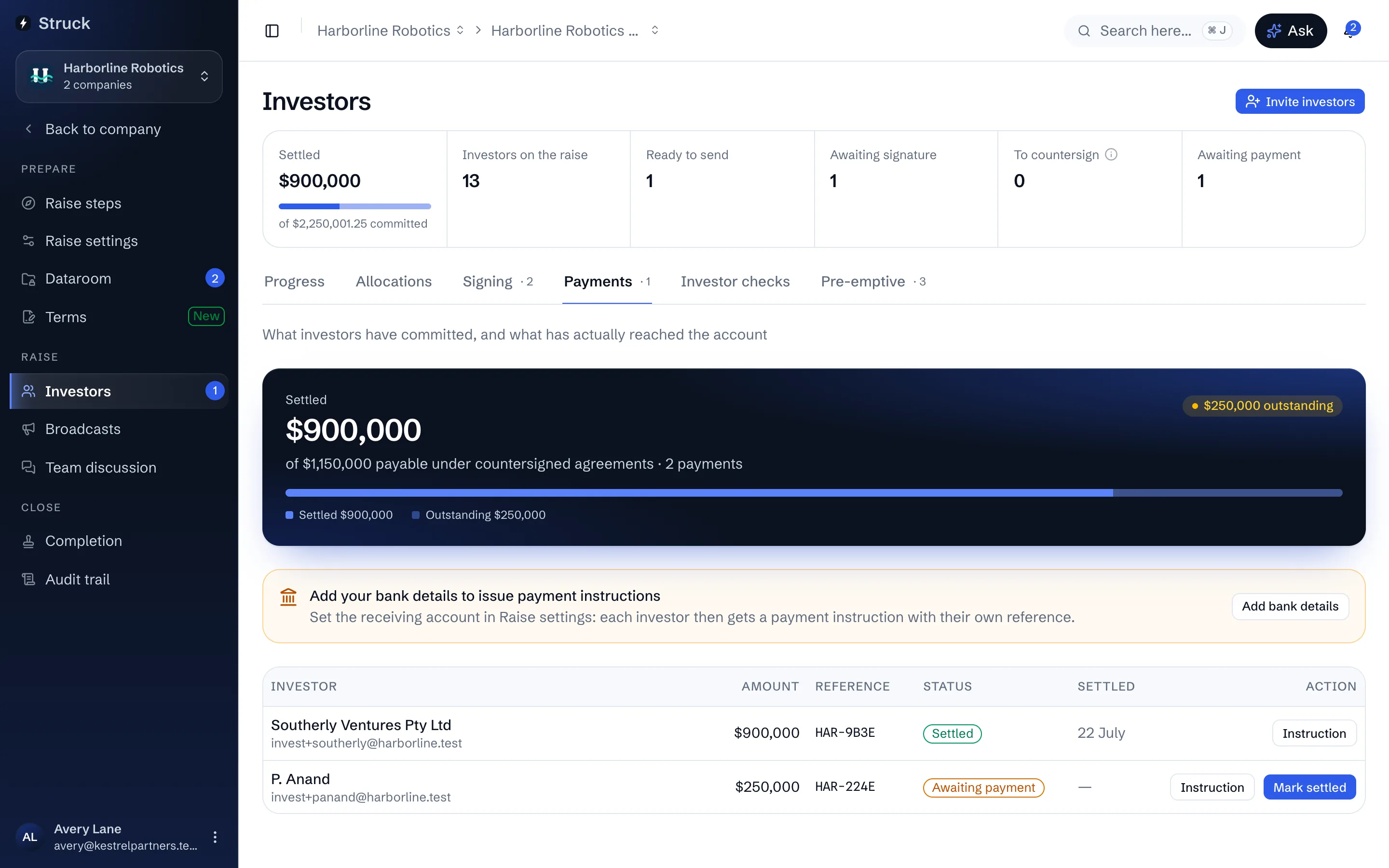
On countersignature each investor is emailed a payment instruction: the amount, the company's account details, a reference of their own and a due date seven days out. The same instruction is on the Payments screen, as Instruction for the deal team and How to pay for the investor, with a PDF to download. Money goes straight to the company's account; Struck never receives or holds it.
Record money as it arrives
When a transfer lands in the company's account, press Mark settled on that investor's row and confirm. Do it only once the money is actually there: Struck never sees the account, so nothing can check it for you. Settled money counts towards the raise and lets the close pack issue that investor's shares. The investor and their signatories are emailed a receipt with a PDF, and the row says Receipt emailed; if it could not be sent, the row says why and Send receipt tries again.
Or settle several at once from a bank statement
Export the receiving account's transactions as a CSV file from your bank, press Import bank statement and choose the file. Each deposit is matched by the payment reference the investor was given, with or without the dash. A deposit with the right amount starts ticked. One with no reference, for the exact amount one investor owes and naming them, is offered unticked for you to check. A deposit that is short or over is shown but never settled from here. Press Settle to record the ticked payments; each row then reads Matched to a bank statement.
The file is read in your browser and is not uploaded. Only the lines you settle are kept, as the record of what each settlement rested on.
Read what the investor has told you
An investor can press Mark payment sent on their side once they have made the transfer. It moves no money and settles nothing; it shows on your row as Investor marked sent with the date, so you know to look for it.
Let the reminders run
While Chase investors automatically is on (Raise settings, Room), payment reminders go out on their own: two days before the due date, on the day, and three and seven days after. Each row shows how many have been sent and when the last one went, and flags an investor who is not responding. Signing packs are chased the same way at 3, 7 and 14 days.
Read next
- Signing packs and countersigningHow it works
- Payments and settlementHow it works
- Raise settings and advisorsHow it works